Saturday, July 23, 2011

LULZSEC TO RELEASE ANOTHER EMAIL ARCHIEVE

0 comments
LulzSec behind a hack on The Sun's website claim to have extracted an email archive which they plan to release later on Tuesday. The Sun's website were redirected towards a fake story on the supposed death of Rupert Murdoch by infamous hacktivist collective LulzSec. The group also redirected visitors to the main News International website to the LulzSec Twitter account.

Sabu leader of LulzSec said via Twitter that the group was sitting on emails of News International staffers that it planned to release. Sabu released email login details for former News International chief exec Rebekah Brooks, a central figure in the News of the World voicemail-hacking scandal.

The hackers also posted the mobile phone numbers of three News International execs. This information seems to have come from an old database.

Thursday, July 21, 2011

How to Change Background Image of Your Blog in Blogger

0 comments
Change Blogger Background Image

After blogger has launched the Template designer , one of the most requested features was the ability to upload your own background image. Though blogger provides hundreds of professional stock photos from iStockPhoto, they know how many of you are serious photo buffs and would like to use your own beautiful photo as your blog's background image.Now you can use your own image as your blogger blogs background. If you want the answer of the question "How to Change Background Image in Blogger" and use your own custom image for your blogs background, keep reading this post.After blogger has launched the Blogger Template Designer, one of the most requested features was the ability to upload your own background image. Though blogger provides hundreds of professional stock photos from iStockPhoto, they know how many of you are serious photo buffs and would like to use your own beautiful photo as your blog's background image.
Steps to Change Background Image of Your Blog in Blogger
Note: Before making any changes to your template, take a full backup of your blogger template.

#Step 1. Go to Blogger In Draft Log in to your Blogger Dashboard and Navigate to Design > Template Designer > Background.

#Step 2. click on Background Image, and you’ll notice a new “Upload image” option, which will allow you to select and upload your image. Upload your custom image and save the template.

For images that fill the entire background, we recommend using a resolution of 1800 pixels wide and 1600 pixels high, and file size less than 200KB to minimize the loading time of your blog pages. We support JPEG, GIF, and PNG format images.

After uploading a photo, you will see additional options that are not available for the built-in images: Alignment, Repeat, and Scroll options.

Set Custom Photo as Blogger Background
  • Alignment: You can adjust horizontal (left, center, right) and vertical (top and bottom) alignment of your background image.
  • Repeat (Tile): If you have a small image, you can have it repeat horizontally and/or vertically to fill the page. Otherwise, we recommend that you choose a page background color that blends in with your background image.
  • Scroll: By default, your image stays in place while readers scroll the page contents. By selecting the “Scroll with page” option, both the background image and page contents scroll together. We recommend that you use an image that blends into your background color or set your image to tile vertically if you choose this option.

This feature is available on Blogger in Draft right now, so please go ahead and check it out!

#Step 3. Save template and done!.

How to Make Blogger Blogs Mobile Phone Compatible

0 comments


How to Make Blogger Blogs Mobile Phone Compatible? .If you are running a blogspot blog then you should think about making your blogger blogs mobile friendly. Actually today i was seeing my Google Analytic account and i was surprised when i saw in the browser details that 15% of the users are using mobile browsers.


Steps to Make Blogger Blog Mobile Phone Compatible

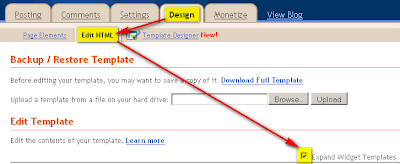
#Step 1. Log in to your Blogger Dashboard and Navigate to Design> Edit HTML and Check the Expand Widget Templates Check box.


#Step 2. Find this code:

and replace it with this code.


#Step 3. Save template and done!.

How to Run Blog Successfully and Earn Money from Blog

0 comments
There are countless bloggers and blogs are there in the web today. Some of these blogs are personal, some are professional, some of them try to sell their products, and most of them are blogs that are created to earn some money.
Everyday huge amount of bloggers are creating new blogs in blogger to start up their online fortune. They all start their blogs with good spirit and ambition to earn some money from the Internet.

However, most of the new blogs are abandoned with failure as people can't see the return of visitors, they expected or spammed by the people and search engine robots. So why do these blogs fail, while others can get lots of visitors and earn lots of money :)

I can tell you why these people stop writing to their blogs. I also have started many blogs. Each blog that created is about different subjects, but after creating many number of blogs i have gave up. Then i have figured out what my mistakes were, and what i need to do to become a successfully blogger.

Patience:
If you are new to blogging era then you must sustain the growth of your blog. key to a blogs success is patience. That is the only thing you have to have from the start. Experts will tell you lots of things about good blogging, but if you don't have the patience, all those good advices will going from one ear and go out from the other. Those experts will tell you that you need to create good content. You need to write about something that you enjoy, something that you know. All of these are right. But without patience you can't do any of these advices. Because it takes time for a blog to become successful and start making money.
- You should have the patience to write regularly.
- You should have patience to create back links.
- You should have patience to do SEO for your blog.

So Patience is the very important key to run any blog successfully.

Thursday, July 7, 2011

4 Best WordPress Plugins for your Blog Security

2 comments

Your blogs are your most valuable possession and you need to keep it secure from any kind of vulnerabilities from any kind of flaws or security risks once your blog starts receiving a good amount of traffic.This is because as your blog gets more and more popular ,and they also know its a wordpress blog,they might keep trying to find ways to creep into your site or keep trying out random passwords in the yoursite.com/ wp-admin page just to have some fun.

So this might prove fatal once if your password has been cracked or there are any security flaws on your site.So here i will telly you the 4 most essential wordpress plugins for your wordpress blog security.

Invisible Defender

Compatible with WordPress 2.7 and higher,this secures your login page,comment section and also the registration page of your website.Works by adding 2 empty hidden text fields under the CSS to verify the spambots that either enter all the fields (including the hidden fields ) or just the WP specific fields(WP targeted spambots). Hence it will redirect to a 403 Forbidden error in case of a SPAMBOT.

Maximum Security

Extremely secure with strong security features.Comes with a fully secure firewalled intrusion prevention system with protection against any kind of malicious intrusion that might occur.Even protects against malicious content on your site that might harm your website traffic.

AskApache Password Protect

Compatible with WordPress 2.6 and higher, provides a multiple layer security for your blog from any kind of automated or less effective hacker attacks.Hence it utilizes the inbuilt security features to create multiple layered wall to protect against spam saving your Database load and CPU slowing down your site.

ChapSecure Login

As the name specifies, provides a secure login feature for your wordpress blog with encrypted login details sent from the login page.Hence only your login password will be encrypted using the chap protocol to provide a secure login using the MD5 checksum.

So there you have it,the best 4 wordpress plugins for your wordpress blog security and safety from any kind of attacks.Feel free to leave your comments to share any plugin you like or anything you would like to share with us..

List of 40+ High Page Rank Free Do-Follow Forums and Blog

2 comments

Link Building is a important part of Search engine optimization.These backlinks will be able to able to rank your page higher and improve your traffic from search engines.But not any backlinks will help you to rank your page higher.

Backlinks specifically from high PR blogs and forums will be able to get you a high page rank for your blog.Do Follow Blogs and forums encourage you to comment on their site by allowing the do follow attribute on their comment section and hence help you to achieve good high PR backlinks.

So here i have listed out 40 blogs and forums that have Do follow attribute to encourage commenting.Try to be active in these pages as frequently as possible to achieve constant good backlinks.

PR 9

http://www.flickr.com/help/forum/en-us/

http://www.addthis.com/forum/index.php

http://www.bibalex.org/a2k/Forum/Topic.aspx

http://quality.mozilla.org/forum

http://www.adjunctnation.com/forums/index.php

Pr 8

http://forum.joomla.org/

http://www.about.com

http://www.campusvirtualsp.org/

PR 7

http://www.bungie.net/Forums/default.aspx

http://www.sitepoint.com/forums/

http://forums.feedburner.com/

http://forums.mysql.com/

http://forums.cnet.com/

http://www.gamespot.com/forums/index.html

http://www.bookforum.com/

Pr 6

Mysql Forum

Deviantart

http://www.currybet.net/

http://www.tvhe.co.nz/

http://bbpress.org/forums/

http://blog.greens.org.nz/

http://forums.amd.com/

http://www.feedforall.com/forum/

http://www.dreamteammoney.com/

http://forum.newsgator.com/

http://www.midasoracle.org/

http://weblogtoolscollection.com/

http://www.zymic.com/forum/

Pr 5

Digital point Forum

http://forums.photobucket.com/

http://sayanythingblog.com/

http://forums.afterdawn.com/

http://www.wickedfire.com/

http://www.v7n.com/forums/

http://www.techsupportforum.com/

http://www.bloggerforum.com/

http://www.daniweb.com/forums/

http://www.bloggertalk.com/

http://forums.worldofwarcraft.com/index.html?sid=1

It might not be possible to stay active in many of forums or blogs.So its better to select about 4-5 key sites your blog is related to and try to stay active in those 4-5 forums or blogs.

Facebook : Insert bold and underlined text in Facebook Chat

0 comments
Facebook chat is a place for many of them to chat with your friends and to be able to express your words properly. So here is the method how you include bold text or even underlined text in Facebook Chat.

The controls for the bold and underline in facebook chat follows similar controls as in Gtalk.

Insert Bold text in Facebook Chat

*Bold letters to be inserted in Facebook Chat* (Shift+F8)

Insert underlined text in Facebook chat

_Text to be underlined _ (Shift+ Minus)

So those were the simple tips on how to insert bold and underlined text in facebook chat.Cheers :)